Shopify ad profitability
Shopify Profit After Ads Calculator
Estimate SKU-level contribution after discounts, included tax or VAT, COGS, shipping, payment fees, refunds, packaging, and ad spend. Use the result to find your break-even ROAS and max CPA before scaling ads.
Payment received
Your Excel workbook is ready. Click Download File on the Creem order page, or open the receipt email from Creem and use the same download link.
Can't find the email? Check spam and search for "Payment receipt" from Creem.
Need help or have feedback? Send feedback
See what is inside the SKU sheet
The paid Excel workbook helps sellers decide which products to scale, watch, pause, or fix after ads and variable costs.
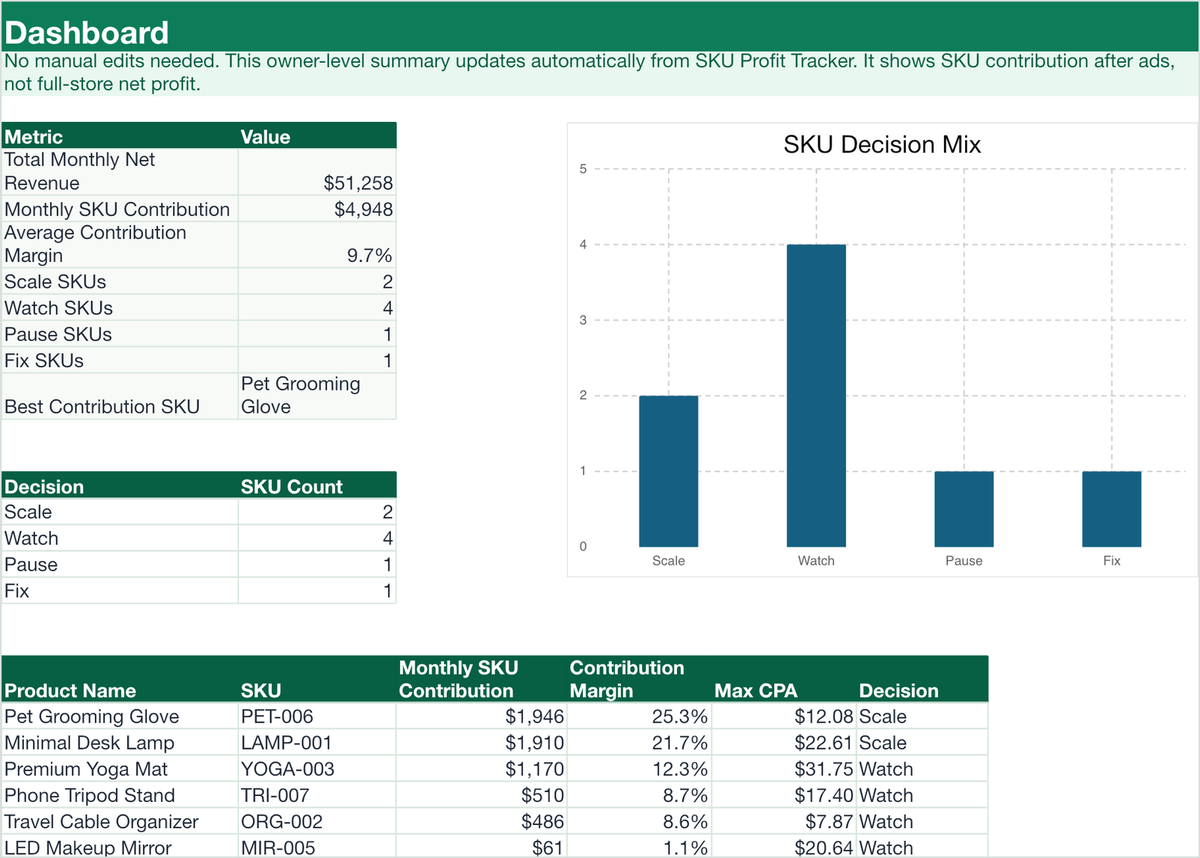
Dashboard overview
See SKU decisions, contribution margin, break-even ROAS, and max CPA in one place.

SKU Profit Tracker
Enter price, discounts, product cost, shipping, packaging, payment fees, refund reserve, and CPA.
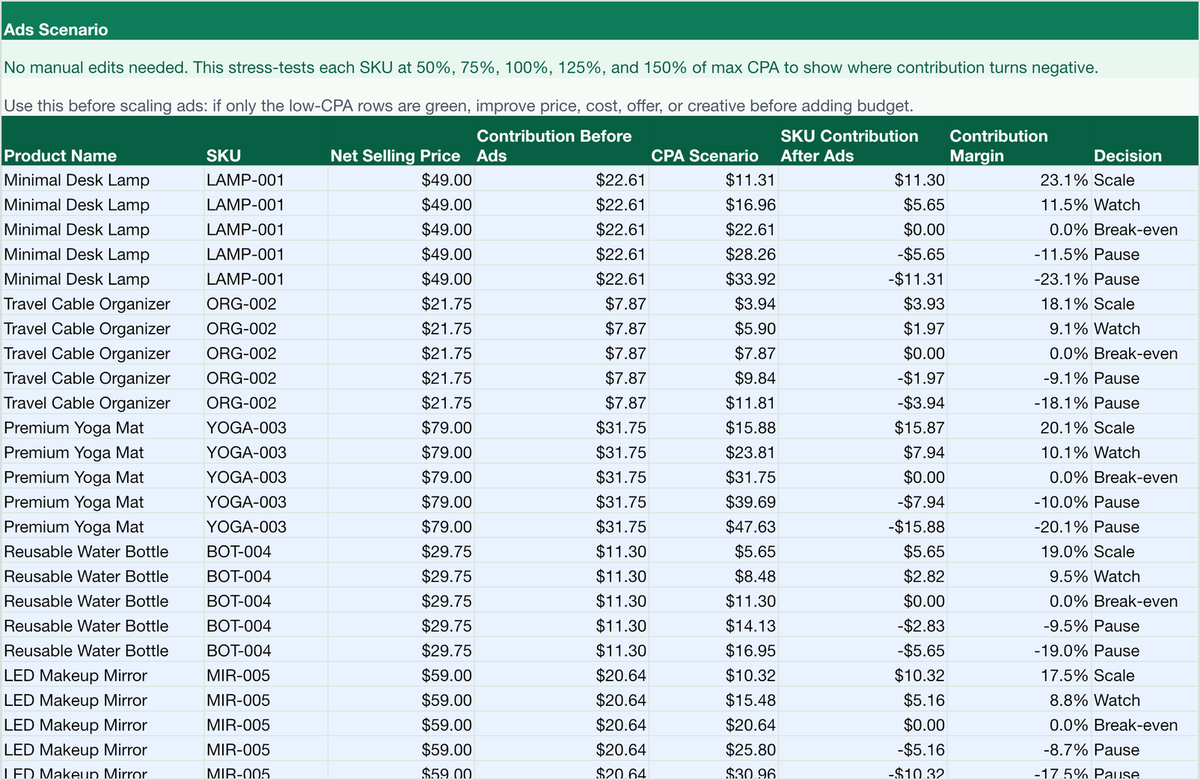
Ads Scenario
Stress-test SKUs at lower and higher CPA levels before adding budget.
Why ROAS alone is not enough
A campaign can show a healthy ROAS and still lose money if product cost, shipping, fees, discounts, included tax, refunds, and packaging leave too little contribution margin. This calculator turns those variable costs into the numbers a Shopify seller needs before scaling ads.
Shopify profit after ads formula
SKU contribution after ads equals net selling price after discounts and included tax minus product cost, shipping, packaging, payment fees, conservative refund reserve, and ad spend per order. This is a SKU-level ad decision metric, not full-store net profit after rent, payroll, software, income tax, or other fixed costs.
Net selling price: list price after discount or coupon impact, excluding included tax or VAT.
Contribution before ads: net selling price - product cost - shipping - packaging - payment fee - refund reserve.
Break-even ROAS: net selling price / contribution before ads.
Max CPA: the most you can spend to acquire one order before the SKU contribution after ads reaches zero.
Need a fuller definition and worked example? Read the SKU profitability formula guide →
How to use the result
- If actual CPA is below max CPA, the SKU has room to contribute after ads.
- If actual CPA is close to max CPA, the margin is thin and needs attention.
- If actual CPA is above max CPA, pause or reduce spend until the economics improve.
- If contribution before ads is already zero or negative, fix price, costs, shipping, or refunds before buying ads.
When this calculator is useful
- Before scaling Meta, TikTok, or Google ads for a Shopify product.
- When a product has revenue but SKU-level contribution is unclear.
- When you need to compare multiple SKUs before choosing what to push.
- When discounts, refunds, shipping, or payment fees make ROAS look misleading.
Frequently asked questions
What is break-even ROAS for Shopify?
Break-even ROAS is the return on ad spend where a product covers its variable costs but creates no SKU contribution after ads. If your actual ROAS is below this number, the product likely loses money on the first order.
What costs should I include?
Include product cost, shipping, packaging, payment processing, discounts, included tax or VAT, refund reserve, and ad spend per order. If an app or platform fee is tied to each order, include it in the closest cost field.
Is this a Shopify fee calculator?
It includes payment fee inputs, but the page is focused on SKU-level contribution after ads. Use it to decide whether a product has enough margin to scale traffic.
Why track profit by SKU?
Store-level averages can hide weak products. SKU-level tracking shows which products can scale, which need cost fixes, and which should be paused.
Does this include fixed costs or LTV?
No. This sheet focuses on first-order SKU contribution after ads. Fixed overhead, repeat purchases, bundles, and multi-SKU carts can change the final business decision.
What happens after payment?
After payment, Creem shows Download File on the order page. The receipt email also includes the same download link, so you can recover the workbook later.
Is this Excel or Google Sheets?
The purchase includes an Excel workbook. You can try importing it into Google Sheets, but the supported version today is the Excel file delivered after checkout.
What costs are included?
The sheet is designed for SKU contribution after variable costs: discounts, included tax or VAT, product cost, shipping, packaging, payment fees, refund reserve, and ad spend or CPA.
Is this full accounting software?
No. It is a SKU-level ad decision sheet. It does not replace bookkeeping, tax filing, inventory accounting, payroll, rent, or full P&L reporting.
Can I request a refund?
Because this is a digital download, refunds may be limited after delivery. If you cannot access the file or there is a clear delivery issue, email support@profitbysku.com with your order email and we will help.
Can I send feedback?
Yes. The feedback form is linked on this page and in the post-purchase message.